

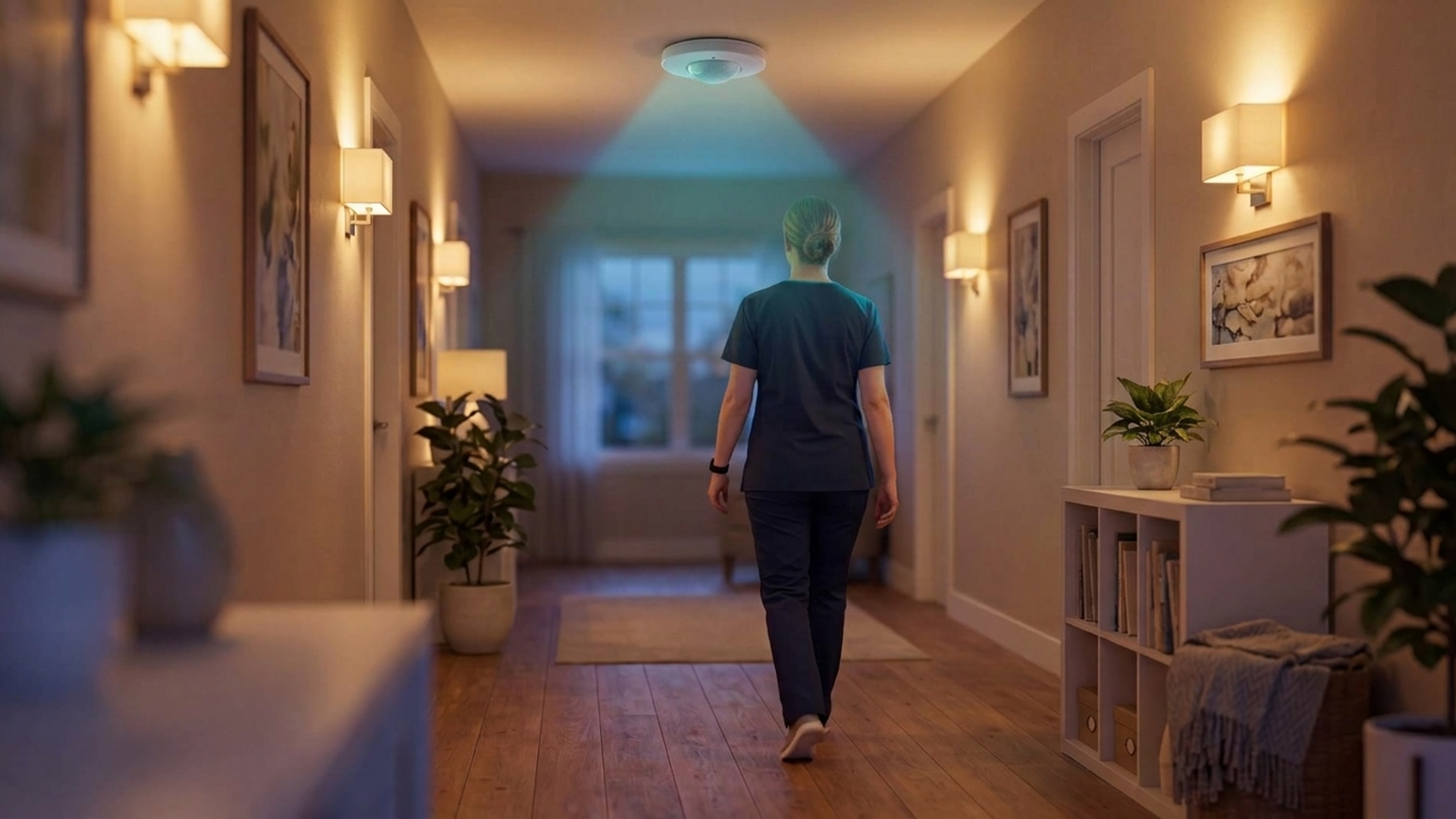
Occupancy sensor types: how to choose for care settings
In this article
Occupancy sensor types differ by detection technology, operating mode, output, and mounting position. Choose across all four so alerts match the room and the event staff need to act on.
The wrong sensing method or placement can miss a resident resting quietly or turn routine movement into false triggers.
Privacy-sensitive rooms need monitoring without unnecessary surveillance. Guardian, a camera-free operations platform for care providers, shows how sensor events can support care workflows without identifiable video.
The main types of occupancy sensors at a glance
The main occupancy sensor types are PIR, ultrasonic, microwave, mmWave, dual-technology, thermal array, time-of-flight, and network-based sensors.
Sensor type | Detection method | Practical fit |
|---|---|---|
PIR | Detects moving body-heat changes | Basic room and lighting control |
Ultrasonic | Reads reflected high-frequency sound waves | Spaces with partitions or obstructions |
Microwave/mmWave | Detects motion through electromagnetic reflections | Fine movement and presence detection |
Dual technology | Combines PIR with active sensing | Complex rooms prone to false triggers |
Thermal/ToF | Maps heat or reflected-light depth | Anonymous counts and doorway crossings |
Wi-Fi/BLE | Reads wireless changes or registered beacons | Building trends or tagged-zone occupancy |
What do we mean by 'sensor type'? Technology, mode, output, and installation
“Sensor type” can refer to the detection technology, operating mode, data output, or installation method. State the dimension when comparing products so unlike categories do not get mixed together.
Technology: The sensing principle, such as infrared, sound, radar, or light, determines where the device can detect presence and which environmental conditions affect it.
Operating mode: Occupancy mode switches a connected load on automatically; vacancy mode requires manual activation, then switches the load off after the space is empty.
Output: A sensor can report a binary occupied state, a numerical headcount, or spatial data such as location and movement across a floor plan.
Installation: The mounting position, such as under-desk, ceiling, wall, bedside, or doorway, sets the area and event the sensor can monitor.
Occupancy sensor technologies explained
Occupancy sensors detect presence through heat, sound, radio waves, or optical depth. The technology determines whether a sensor notices someone walking through a corridor or remaining still beside a bed, along with its placement and privacy requirements.
Passive infrared (PIR) sensors
PIR sensors spot movement when a person's heat pattern moves across their field of view.
A Fresnel lens splits the covered area into zones and directs infrared energy to the sensor. When a person moves between zones, the sensor registers the change.
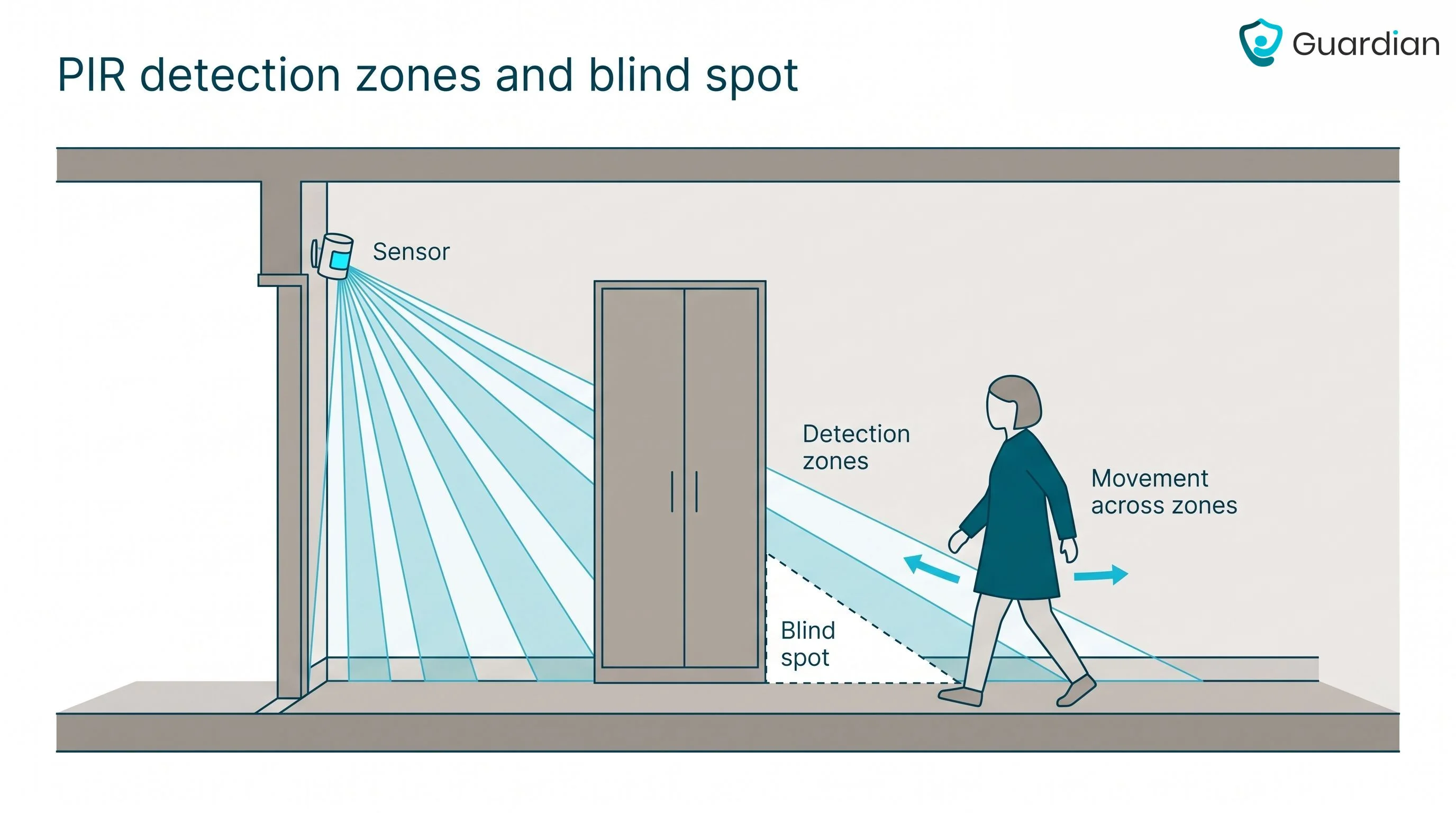
PIR works best when movement crosses its detection zones rather than approaching the sensor head-on. Place it where people cross a clear field of view.
Blind spots: Partition walls, tall furniture, and structural corners block infrared energy from reaching the sensor.
Low thermal contrast: human motion becomes harder to separate from surroundings when background temperatures approach body surface temperature.
Rapid heat changes: Sunlight shifts, heaters, or hot airflow crossing detection zones can create infrared changes that resemble movement.
Ultrasonic sensors
With ultrasonic sensing, the device sends out sound and checks returning echoes for movement.
The sensor compares the returning echo with the sound it sent. A changed echo can indicate movement.
Reflected sound can extend detection around some furniture and partial partitions, including small hand movements such as typing. Coverage still depends on room geometry and sound-absorbing materials.
Ultrasonic sensing can suit obstructed rooms, but it needs careful commissioning around HVAC airflow, vibration, and moving curtains.
Microwave, radar, and mmWave sensors
Microwave sensors detect motion from reflected electromagnetic waves. Radar and mmWave systems analyse finer return-signal changes and can detect smaller movements, depending on their frequency, antenna design, and processing.
Basic microwave units commonly use Doppler changes for motion. Finer radar or mmWave systems can use Doppler and phase changes to estimate presence and small movement.
For ordinary occupancy use, treat the output as presence or fine movement rather than a clinical vital-sign measurement.
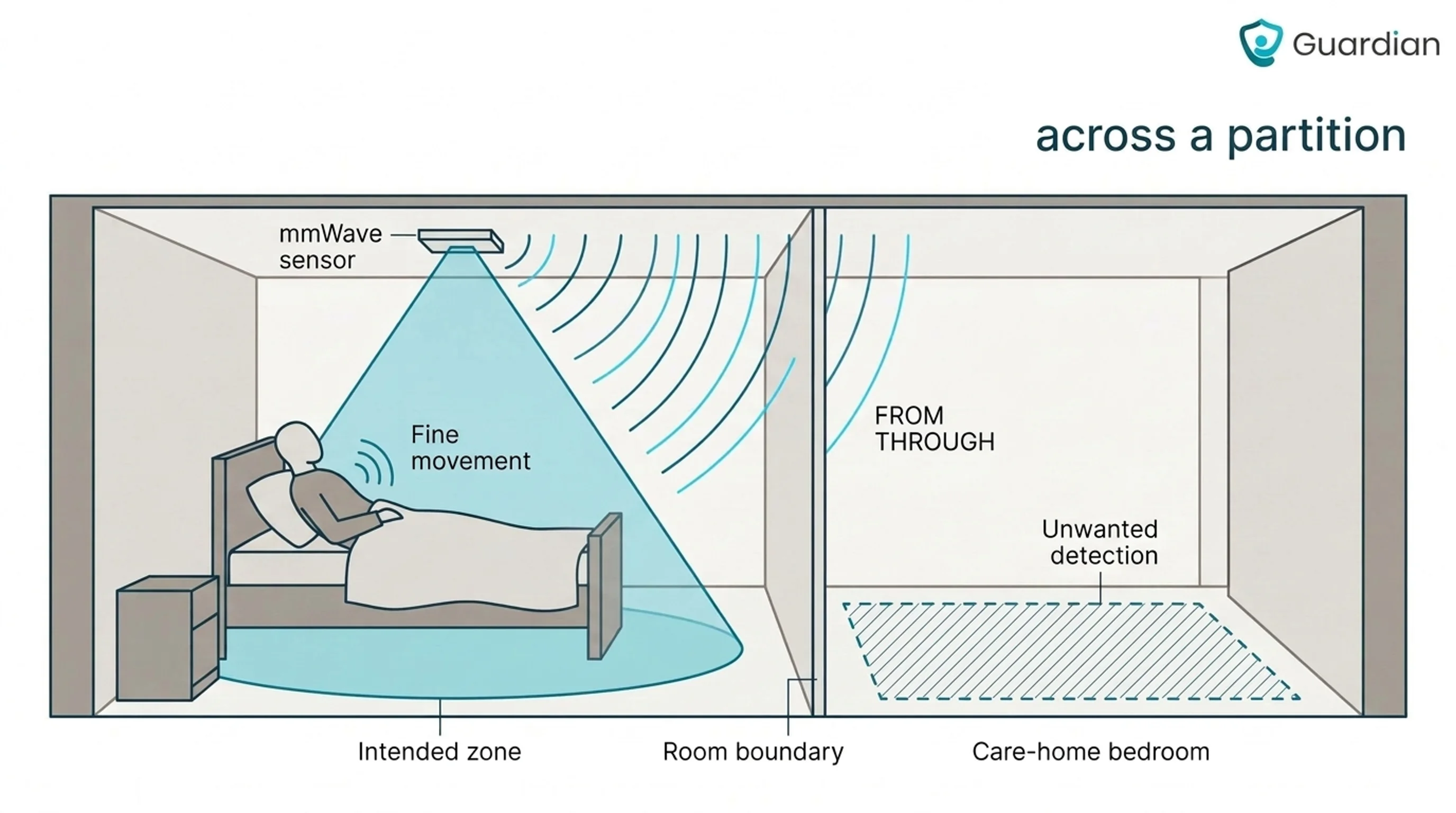
Obstructed coverage: Signals can pass through some non-metallic materials, reducing the need for direct sightlines but risking detection beyond the intended room.
Temperature tolerance: Detection does not depend on body heat, which avoids the thermal contrast problem that can affect PIR in hot areas.
High sensitivity: Moving curtains, fans, and other non-human motion can trigger occupancy events.
Boundary spillover: Signals that pass through lightweight walls or partitions can register movement in an adjacent room.
Dual-technology sensors
A dual-technology sensor combines PIR with ultrasonic or microwave sensing in one unit.
Initial activation: A common configuration requires both sensing methods to confirm movement, but some products use OR or adaptive logic.
Continued occupancy: One sensing method can keep the occupied state active, depending on configuration, so brief stillness does not cause an early shutoff.
The paired methods can cover interrupted sight lines in partitioned rooms. PIR may detect movement in its view, while ultrasonic or microwave sensing can continue around cubicles, furniture, or partial barriers.
Decision rule: Use dual technology when false-trigger control justifies extra commissioning. A single well-placed sensor is simpler when one method already covers the room reliably.
Thermal arrays and time-of-flight sensors
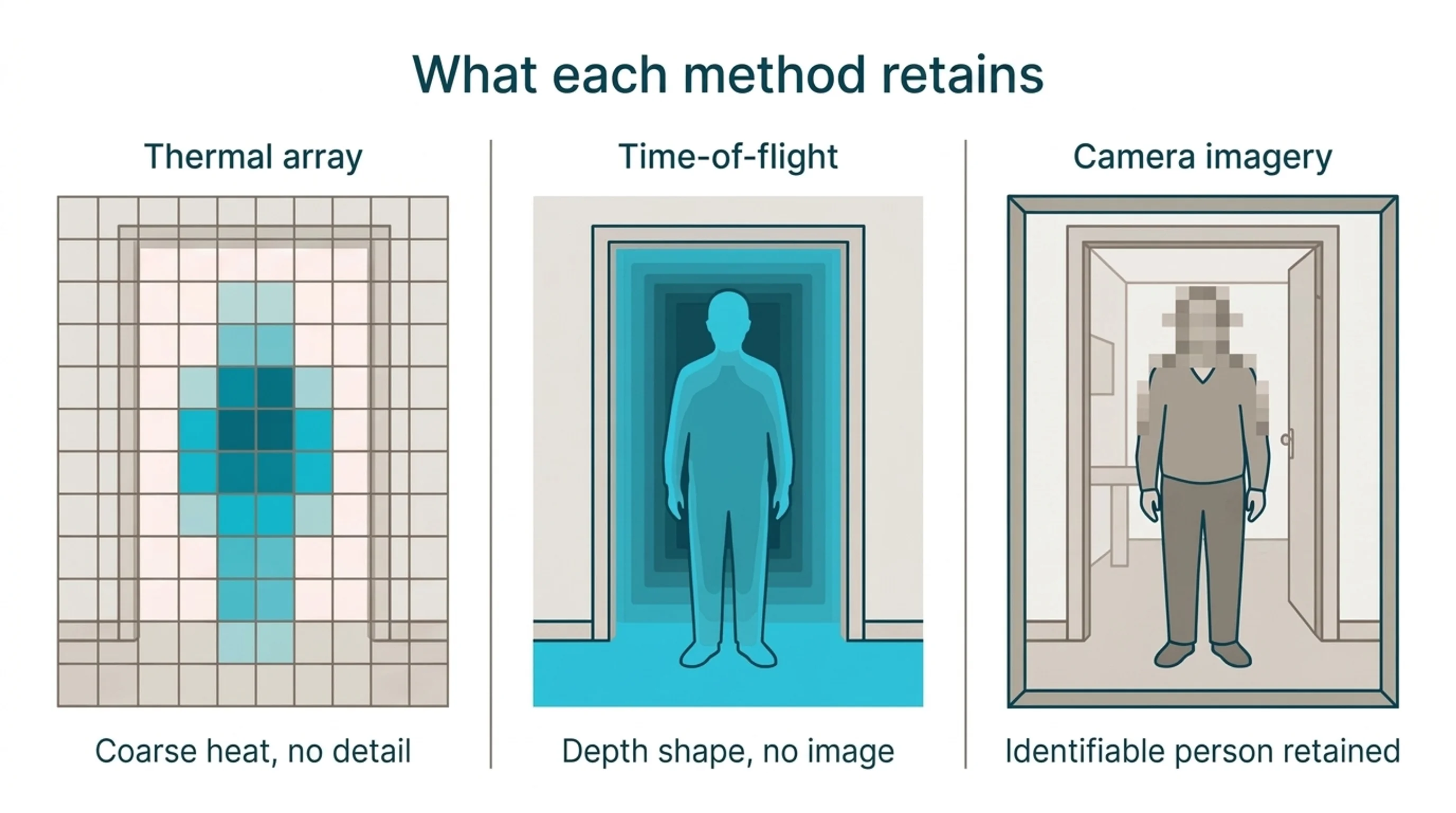
Thermal arrays map emitted heat across a low-resolution grid. A resident leaving bed can appear as a warm region moving toward a doorway without producing a recognisable optical image.
Thermal arrays can register a seated or lying person when resolution, distance, heat contrast, and occlusion allow. Changes between grid cells can show coarse direction.
Low resolution reduces visual detail but does not make linked data anonymous. Time-of-flight sensors instead measure reflected light and distance, producing depth data for presence, counts, or doorway crossings without conventional colour video.
Camera-based occupancy sensors
At a doorway or shared lounge, camera-based sensors use image analysis to count people and map movement. Some systems also classify objects or track direction.
Camera-based sensors provide finer spatial detail, but not every system stores a visual record. Privacy risk depends on whether identifiable frames leave the device, who can access them, and how long they remain stored.
Capabilities: precise counts, movement paths, zone use, and object classification
Privacy: identifiable imagery can restrict use in bedrooms, bathrooms, and other sensitive spaces
Trust: False or poorly prioritised alerts can create alarm fatigue and weaken staff confidence, a risk discussed in the Future of AI in Senior Living and Care report.
Before a camera goes live, document the doorway or zone it watches and who may view imagery.
Set an alert staff can recognise, such as a person entering a restricted zone. Staff should know what appears on their device and what response is expected.
Wi-Fi and Bluetooth (BLE) sensing
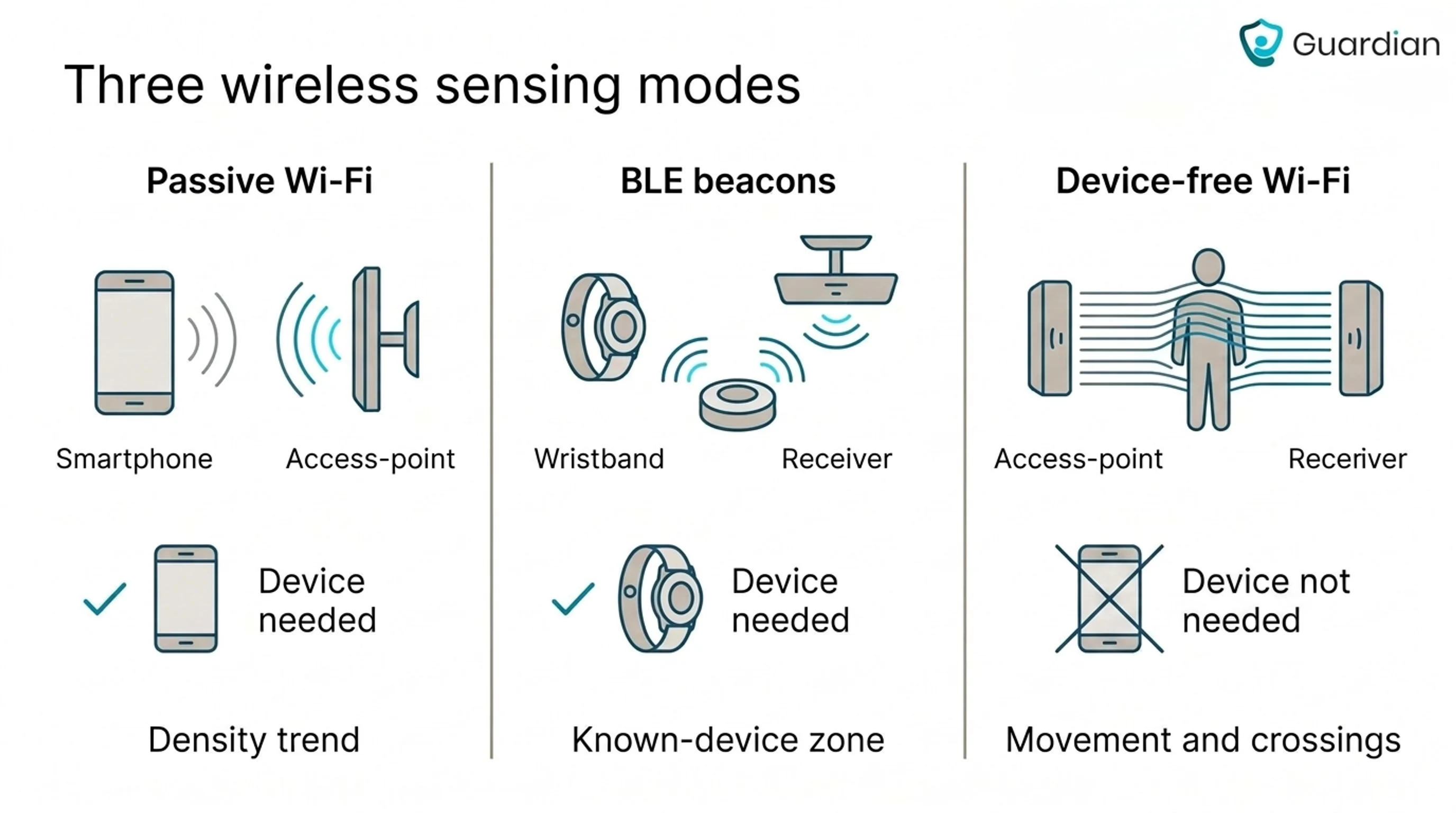
Wi-Fi and BLE cover several sensing modes. Passive device detection estimates nearby devices, registered BLE beacons or wearables track known devices, and device-free Wi-Fi sensing reads changes in the radio channel.
Receivers can count probe requests, connections, or beacon signals, while device-free systems analyse channel changes. Outputs may include density trends, known-device zones, movement, or doorway crossings.
Passive device detection and beacon tracking require a carried, active device. Identifier randomisation can disrupt continuity, while device-free Wi-Fi sensing has different calibration and infrastructure limits.
Specialized and indirect detection methods
When direct sensing will not work, indirect methods infer room or station use from environmental change, physical contact, or equipment activity. These signals indicate likely occupancy, not exact person-level presence.
CO2 sensors: CO2 change can support occupancy estimates only against a ventilation baseline. ANSI/ASHRAE 62.1 informs ventilation design, not headcount logic.
Installation note: UL 2043 may apply to equipment installed in air-handling spaces; it does not define occupancy estimation.
Acoustic sensors: Sound activity can confirm that a space is active without retaining intelligible audio when configured that way. Silence cannot prove vacancy, and sound alone cannot identify or count occupants.
Pressure mats and chair pads: A load change confirms that a specific floor area or seat is occupied, but it cannot establish who caused the pressure.
Power monitors: Electrical draw can show that a monitor or other device is operating, but equipment use does not prove that a person remains at the desk.
Occupancy vs. vacancy vs. motion sensors: what's the difference?
Motion sensors respond to movement. Occupancy sensors can switch a system on when they detect someone, while vacancy sensors need a manual switch-on and turn off after the space is empty.
In a bedspace, a basic motion sensor can time out while a resident rests quietly. Presence sensing or a bed-specific input is better suited when staff need an alert tied to that context.
The same limit appears at a desk or in a meeting room: the person remains present, but too little movement reaches the sensor.
Occupancy sensors by installation type: desk, room, ceiling, and doorway
Mounting location sets the area a sensor can monitor. In a care home, match that area to the event staff need to act on, such as a bedspace or doorway crossing.
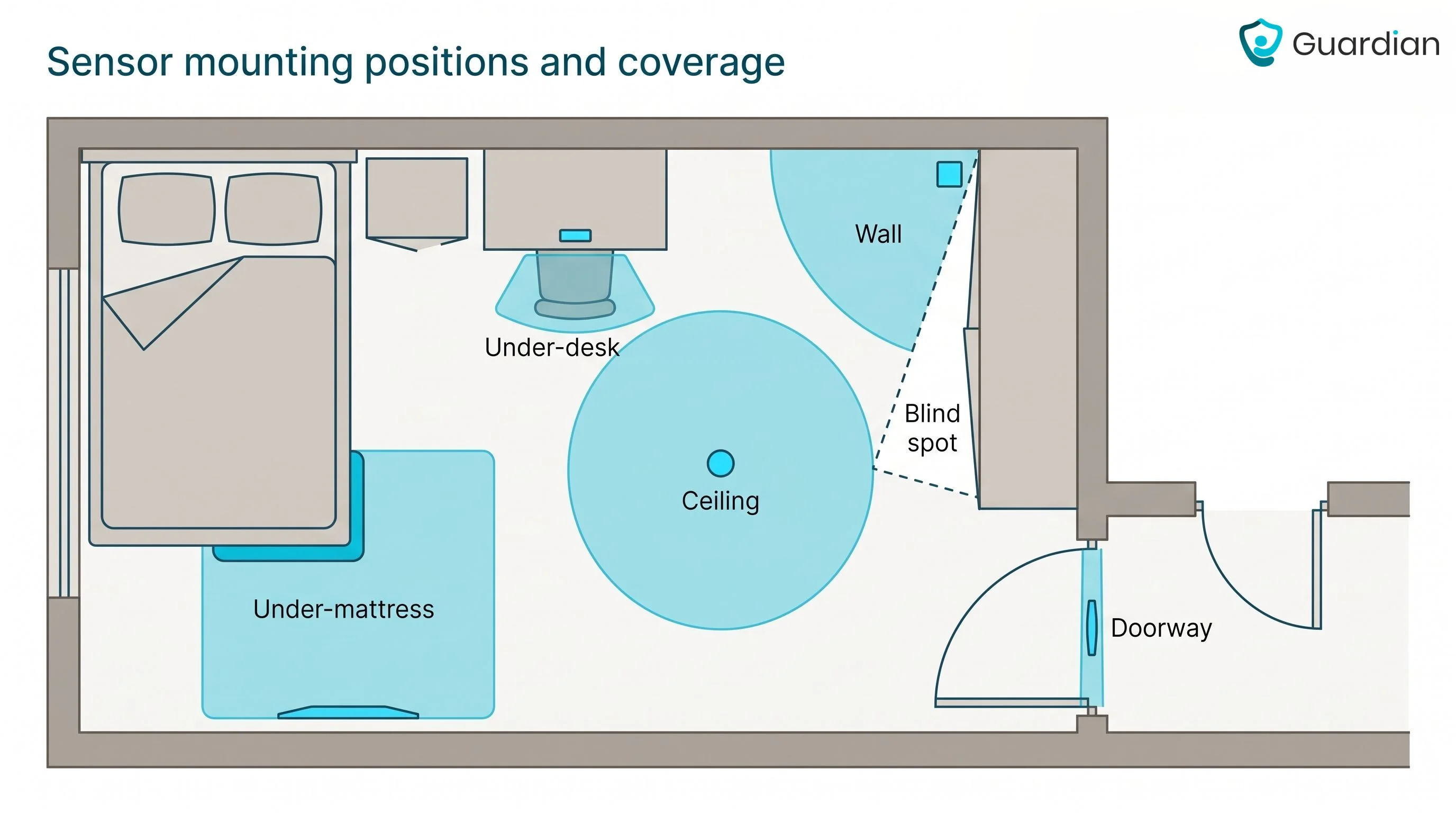
Installation type | Mounting position | Coverage pattern | Best-fit measurement |
|---|---|---|---|
Under-desk | Beneath one workstation surface | Seat-sized directional zone below tabletop | Workstation occupancy and use duration |
Ceiling | Above a room or open area | 360-degree cone across the floor | Area occupancy in rooms or open plans |
Wall or corner | Switch box or upper room corner | 90- to 180-degree fan-shaped zone | Enclosed-room presence or lighting control |
Doorway | Over threshold or on door frame | Downward beam or open-close contact | Directional counts or door state |
How to choose the right sensor for your space and goal
Choose an occupancy sensor by matching the required output to the room’s geometry, privacy limits, and available power and network infrastructure.
Define the decision. State the event the sensor must support, such as switching a bathroom light or alerting staff to a bed exit.
Choose the output. Use occupied or vacant status for lighting and HVAC, counts for footfall, or direction and location for operational alerts.
Map the room. Check sightlines, partitions, reflective surfaces, likely movement paths, and the boundary beyond which detection would be unwanted.
Set privacy limits. Decide whether raw readings, event records, identifiers, depth maps, or imagery may be processed and retained.
Check infrastructure. Match battery, line-voltage, PoE, wireless, and network requirements to the building and installation plan.
Pilot the placement. Trial the proposed sensor in the real room before a full rollout, including quiet occupancy and likely false-trigger conditions.
For a bed-exit workflow, define the risk window first. Then choose a bed-specific or suitable presence input, set the alert rule, map it to the room and bed, and test what staff receive.
Occupancy and vacancy sensor symbols and wiring paths
Occupancy and vacancy sensor diagrams commonly pair a device symbol with labels such as OS or VS. The exact symbol, abbreviation, and control sequence depend on the project legend.
Use the labels as a quick reading aid rather than a universal symbol set:
Label | Common drawing form | Usual meaning |
|---|---|---|
OS | Switch or ceiling symbol marked OS | Occupancy sensor |
VS | Wall-switch symbol marked VS | Manual-on, automatic-off vacancy sensor |
PIR | PIR beside the sensor symbol | Passive infrared sensing |
US | US beside the sensor symbol | Ultrasonic sensing |
DT | DT beside the sensor symbol | Dual-technology sensing |
PP / RP | Labeled rectangular controller box | Power pack or relay pack |
OSD / DIM | Dimming suffix on sensor label | Sensor with dimming control |
2OS | Number or circuit suffix with OS | Dual-circuit sensor control |
Use the project legend and manufacturer instructions to confirm what each label controls. A qualified installer should approve any wiring changes.
What occupancy data actually reveals about privacy
Occupancy data can range from lower-identification room presence to a named person’s routines and movements. Risk depends on the raw data, retention period, and whether events link to a resident, room, phone, wearable, or schedule.
The Argentum 2025 Technology Report found that 26% of surveyed senior living executives named data privacy as their primary technology-adoption concern.
Sensor type | Data captured | Identification risk | Practical control |
|---|---|---|---|
PIR / ultrasonic | Motion and presence changes | Low; no direct identity signal | Retain events, discard raw readings |
Radar / mmWave | Position, micro-movement, breathing patterns | Medium; movement traces can distinguish people | Process locally; retain events only |
Thermal arrays | Low-resolution heat patterns and occupant counts | Low; faces and clothing remain hidden | Limit resolution; discard heat maps |
Wi-Fi / BLE | Device identifiers, signal strength, movement zones | Medium to high; devices can link people | Rotate identifiers; aggregate zones; shorten retention |
Cameras | Video, faces, clothing, screens, room activity | High; people and behaviour are visible | Restrict placement, access, retention, and consent |
For care teams considering camera-free monitoring, Guardian turns events such as bed exits into alerts linked to care workflows. The next section explains the operational path from detection to response and review.
Beyond lighting control: camera-free occupancy sensing for care operations with Guardian
Lower-identification occupancy data matters when staff can act on it. Guardian is a camera-free operations platform for care homes, home care teams, and other specialist care settings.
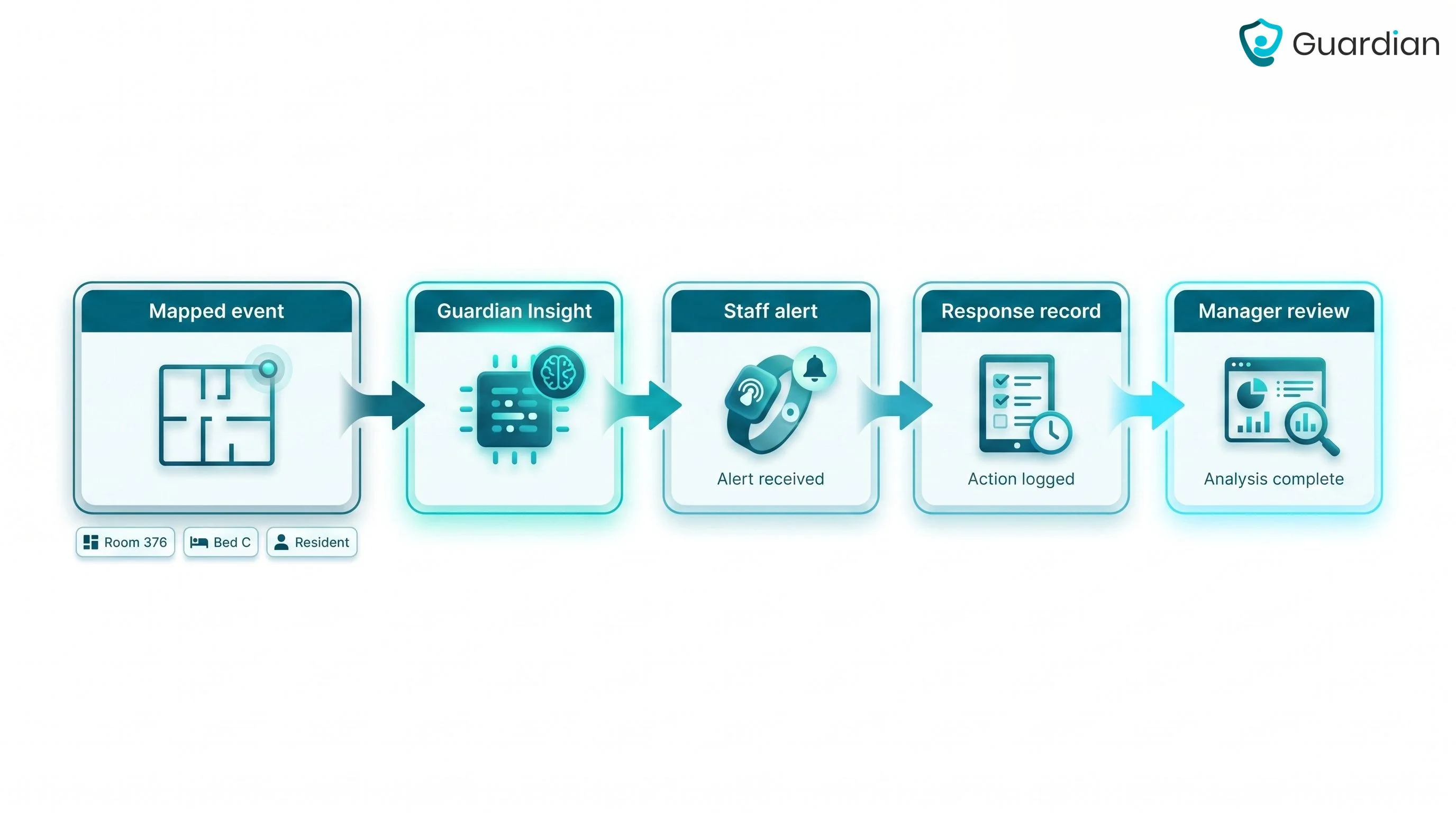
A mapped sensor event enters Guardian Insight with its room, bed, and resident context. Staff receive the alert on phones, tablets, or nurse-station screens, while managers can review what happened after the shift.
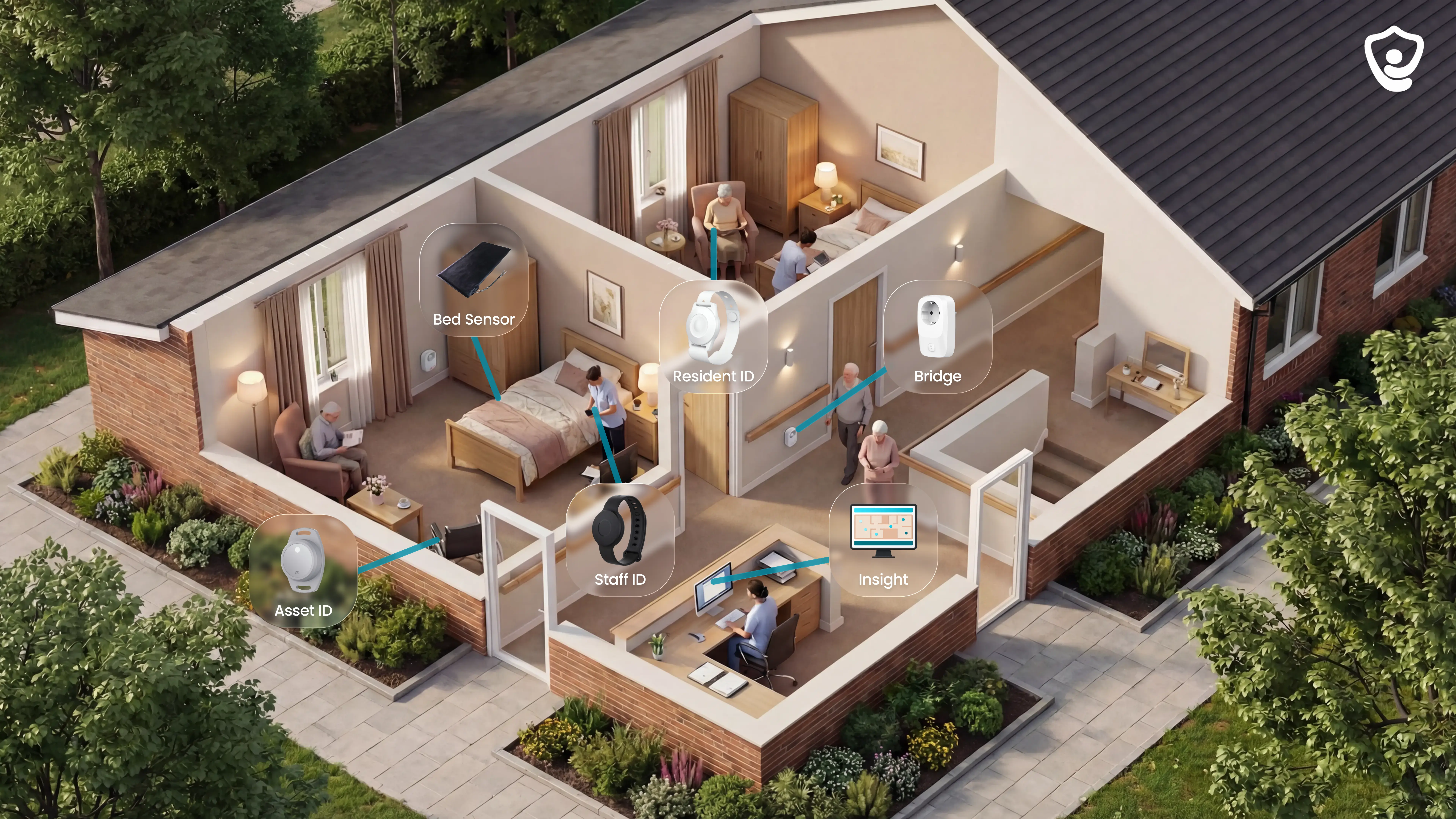
Camera-free monitoring: Bed, motion, and environmental sensors can track relevant activity without placing cameras in private spaces.
Location-aware alerts: Guardian maps sensors to rooms and beds on a digital floor plan, so staff receive the resident's name and room-level location with each alert.
Timestamped operational evidence: Guardian records visits, shift timing, response times, and incidents for managers to review with families, inspectors, or internal teams.
Occupancy sensors send an occupied or vacant signal to the HVAC controller, which can adjust heating, cooling, or ventilation when a room is empty.
The sequence must preserve the room's minimum ventilation. Set it with the building controls contractor, especially in resident areas.
The U.S. Department of Energy includes occupancy sensing among commercial building-control measures.
Occupancy sensors work with LED lights and dimmers when the sensor, LED driver, and dimming method are compatible.
Check the driver's inrush current against the sensor relay's NEMA 410 rating. For dimming circuits, follow the driver's documented wiring method.
A neutral-connected sensor keeps standby power separate from the LED driver. On two-wire circuits, leakage can cause ghosting or strobing, so the circuit may need a compatible bypass.
Outdoor occupancy sensors need weather-rated housing and settings that account for local conditions. Wind and wildlife can trigger alerts, so choose a sensor made for outdoor use.
Choose IP65 or NEMA 4X hardware that suits the site's exposure. Confirm that the listed operating temperature range suits local conditions.
Wind can disrupt an ultrasonic sensor's acoustic waves and cause missed detection or false triggers outdoors.
Neutral-connected wall sensors use a neutral for standby power, but no-neutral retrofit models are also available. Battery and wireless sensors do not need an AC neutral at the device.
Check the product instructions and local electrical requirements before selecting or wiring a wall sensor.
No-neutral models may draw a small current through the lighting load, so confirm LED compatibility and whether the circuit needs a bypass.

Author
Aleks Timm
Aleks Timm leads Guardian and builds privacy-first operations technology for care homes and home care providers. Teams get location-aware alerts they can act on, clearer situational awareness, and measured insight into how care work actually runs.
Read MoreRecommended reads
Keep reading
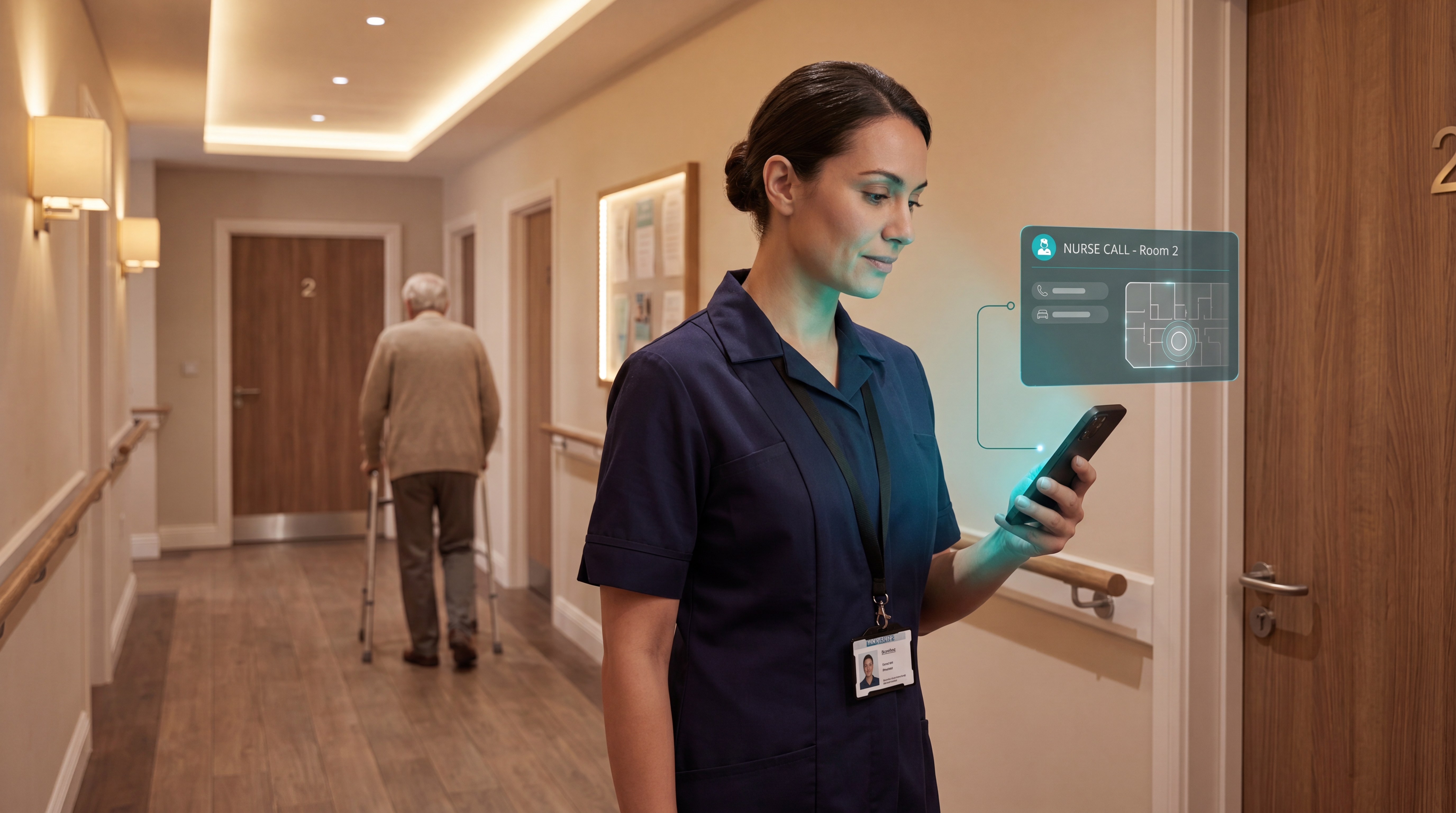
Smart Nurse Call Systems for Care Homes and Home Care Providers
Smart nurse call systems for care homes and home care providers: compare features, improve response times, and choose the right...
Read more
WiFi nurse call system guide for care homes
WiFi nurse call systems explained: alerts, clean records, and no wiring—compare options and choose the right setup for your care...
Read more
Remote patient monitoring: a complete guide
Remote patient monitoring: the complete guide to sensors, benefits, and buying tips for safer care homes and better resident...
Read more